

Adding a Database#
We will use sqlite3 as it is readily available and none of the data is particularly valuable. The data can be loaded as one table, check on the two sets of dummy data, the table requires a unique column id two columns for query and ans then a column for song.
Adding Song Files#
song will point to the file. As we are going to store the songs in the static directory in the sub-folder songs check how jinja2 retrieves information from static files using url_for:
sound = url_for('static', filename=soundfile)
Within quiz.html audio controls plays the source as src = {{sound}}, therefore the song files will all require songs/ immediately preceding the filename.
The bird songs came from xeno-canto.org, which are extraordinaly comprehensive.
By now your files should be as follows:
Flask
   ├──static
   │   └──songs
   │      ├──Common Cuckoo.wav
   │      ├──Common Wood Pigeon.wav
   │      ├──Eurasian Blue Tit.mp3
   │      ├──Eurasian Skylark.mp3
   │      └──European Green Woodpecker.mp3
   │
   ├──templates
   │  ├──base.html
   │  ├──home.html
   │  ├──index.html
   │  ├──quiz.html
   │  └──result.html
   │
   ├──bird.py
   ├──config.py
   ├──venv
   └──quizbird.csv
Create a Database#
When creating a database the most difficult part is setting up a csv file that can easily be loaded into the database. All spreadsheets have the ability to create a csv file, so choose your spreadsheet and create the named columns. When saving as an csv file ensure that it is saved in UTF-8 format with semi- colons as separators, also create the first column with numbers starting from 1 and incrementing by 1 to 5 call it id
id;question;song;answer
1;Heard by woodland edge and near reed beds, a sure sign of Spring;songs/Common Cuckoo.wav;Cuckoo
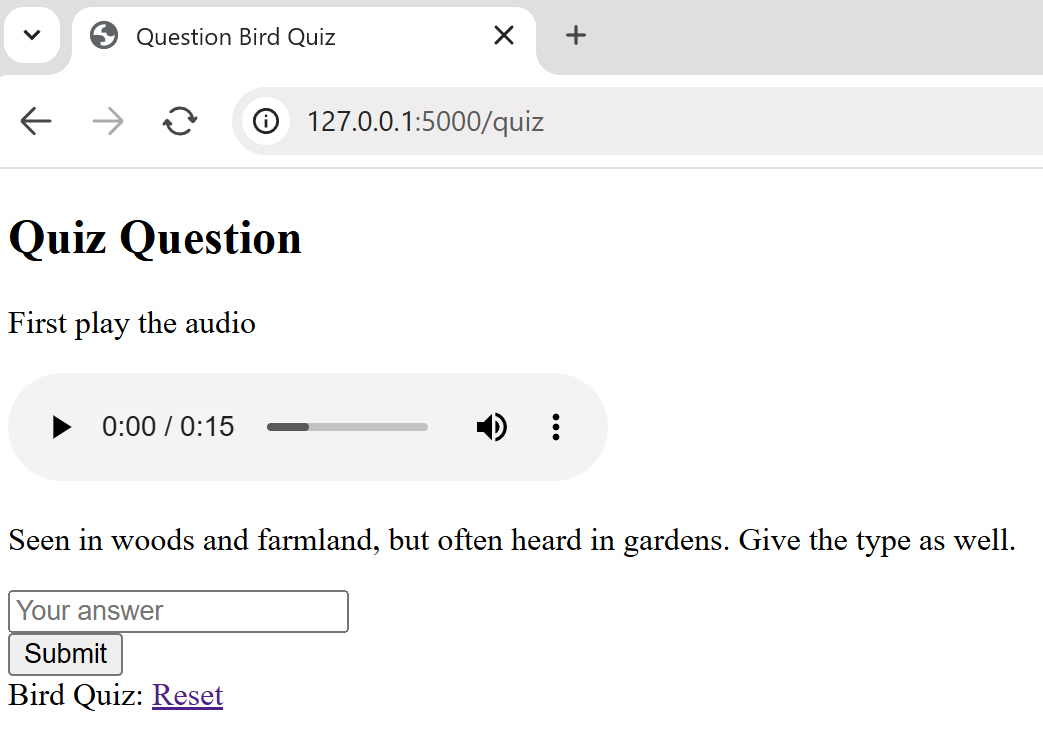
2;Seen in woods and farmland, but often heard in gardens. Give the type as well. ;songs/Common Wood Pigeon.wav;Wood Pigeon
3;Found in woodlands, parks and gardens. Give the type as well. ;songs/Eurasian Blue Tit.mp3;Blue Tit
4;Heard over grassland, marshes and heathland;songs/Eurasian Skylark.mp3;Skylark
5;Heard and seen in woodlands, heaths and grassy areas. Give the type as well. ;songs/European Green Woodpecker.mp3;Green Woodpecker
Open a sqlite interface on the desktop at your Flask directory, in Windows. Use cmd.exe, type in the following to create an sqlite3 database called mydb.db, the table columns are made automagically with the same name as the first row of the table birdquiz:
sqlite3 mydb.db

sqlite> .mode csv
sqlite> .separator ";"
sqlite> .import quizbird.csv birdquiz
sqlite> SELECT * FROM birdquiz;
Make sure that there are no empty lines at the end of the file - that
will show up when we SELECT * FROM birdquiz;.
When retrieving data from the databank we will be doing it line by line, the first line will be 1, no longer 0. bird.py needs changing from the dummy data to the database:
....
import sqlite3
...
# Function to establish database connection
db_connection = lambda: sqlite3.connect("mydb.db")
Remove the dummy data quizlet.
Within index route change the starting value of session["count"] from 0 to 1:
...
session.pop("count", None)
session["count"] = 1
...
Change the conditional clause if session["count"] > 1: to if session["count"] > 5:
@app.route('/quiz', methods=['GET', 'POST'])
def quiz():
if session["count"] > 5:
Soon after is user_answer this is compared to the correct_answer from the database:
....
if request.method == 'POST':
   question_id = request.form.get('question_id')
   user_answer = request.form.get('user_answer').strip().title()
   # Fetch the correct answer from the database
   conn = db_connection()
   cursor = conn.cursor()
   cursor.execute("SELECT answer FROM birdquiz WHERE id = ?", (question_id,))
   correct_answer = cursor.fetchone()[0].strip().title()
   cursor.close()
   conn.close()
This replaces:
correct_answer = quizlet[session["count"]]['ans'].strip().title()
A little later a single row is retrieved from the database, this replaces:
select = quizlet[session["count"]]
soundfile = select['song']
replaced by:
conn = db_connection()
cursor = conn.cursor()
cursor.execute("SELECT id, question, song FROM birdquiz WHERE id = ?", (session["count"],))
select = cursor.fetchone()
conn.close()
soundfile = select[2]
To play the songs we will need song files. Create a new folder static, with a sub-folder songs. static is at the same level as the folder templates.
Change quiz.html from:
<p>{{ select['query'] }}</p>
....
<input type="hidden" name="question_id" value="{{ select["id"] }}" >
to:
<p>{{ select[1] }}</p>
....
<input type="hidden" name="question_id" value="{{ select[0] }}" >
As this is a demonstration there are only 5 questions remember to increase the limit if you have more questions.
At present the application is functional, but has no feedback to the users of how well they did.
Database File Updates#
Apart from bird.py and quiz.html no files were updated, but the bird songs and quizbird.csv are new. mydb.db is simply formed by copying the instructions above.